 c7ec5a7e70
Merge in OPAPM/coco_apm_reportingbase from qxd0086/environmentyaml-1678725093987 to master * commit '3f1c7b632836618268daca91877a014ddb23f95b': fixed CN env-urls |
||
|---|---|---|
| assets | ||
| Jenkinsfile | ||
| README.md | ||
| createReport.py | ||
| environment.yaml | ||
| requirements.txt | ||
README.md
Dynatrace Reporting Pipeline
This repository is used as a template to create automated Dynatrace reports through Jenkins (JAWS) which are sent as attachement through mail.
Jenkins environments
EMEA & NA: https://jaws.bmwgroup.net/opapm/
CN: https://jaws-china.bmwgroup.net/opmaas/
Request access
Access is granted manually through stephan.oertelt@bmw.de and Mohammed.Abadel@bmw.de
Multi-Branch Pipelines
- master (=latest) --> for testing and developing stuff
- staging --> pre-release branch, if stuff tested successfully here merge it to production
- production --> actively used, productive reports
Minimum Content of a Dynatrace Reporting Repo
Repository & Pipeline Naming
- Repository and Pipelines must have identical names
- Naming must start with CoCo_APM_Reporting_report name here
readme-File
The readme file must contain a useful description what is reported when to whom
Example:
This report is reporting all installed OneAgent versions including:
- Hostnames
- Environment Tag
- PaaS Tag
Sent to: coco-apm@bmw.de
Executed on each Monday of every week
Executed on every Dynatrace environment
requirements.txt
The requirements.txt file must contain all python packages which are used within the script through import
e.g.:
pyyaml
pandas
decouple
requests
datetime
argparse
environments.yaml
The environments.yaml contains all environments on which the script should be executed, environments which should not be executed may be excluded through #
Do NOT change the environments names, the pipeline script is configured to distingue between EMEA/NA and CN as their are different Jenkins environments!
The following snipped shows an environment file, which is only executed on Dynatrace prod environments.
euprod:
    - name: "euprod"
    - env-url: "https://xxu26128.live.dynatrace.com"
    - env-token-name: "EUPROD_TOKEN_VAR"
#eupreprod:
    - name: "eupreprod"
    - env-url: "https://qqk70169.live.dynatrace.com"
    - env-token-name: "EUPREPROD_TOKEN_VAR"
#napreprod:
    - name: "napreprod"
    - env-url: "https://onb44935.live.dynatrace.com"
    - env-token-name: "NAPREPROD_TOKEN_VAR"
naprod:
    - name: "naprod"
    - env-url: "https://wgv50241.live.dynatrace.com"
    - env-token-name: "NAPROD_TOKEN_VAR"
cnprod:
    - name: "cnprod"
    - env-url: "https://dynatracemgd-cn.bmwgroup.net/e/b921f1b9-c00e-4031-b9d1-f5a0d530757b"
    - env-token-name: "CNPROD_TOKEN_VAR"
#cnpreprod:
    - name: "cnpreprod"
    - env-url: "https://dynatracemgd-cn.bmwgroup.net/e/b921f1b9-c00e-4031-b9d1-f5a0d530757b"
    - env-token-name: "CNPREPROD_TOKEN_VAR"
Jenkinsfile
The Jenkinsfile is the pipeline script itself including:
- Time-Trigger
- Install package step
- Execute script step
- Send Mail step
Python Script
The script itself will gather and aggregate the data from the Dynatrace environments.
Script output must be a csv or excel file in the folder where the script is executed
First Usage - Create a new Pipeline
Fork this repo
Do NOT clone this repo, create a fork instead.
- On the left menue bar click on Create fork
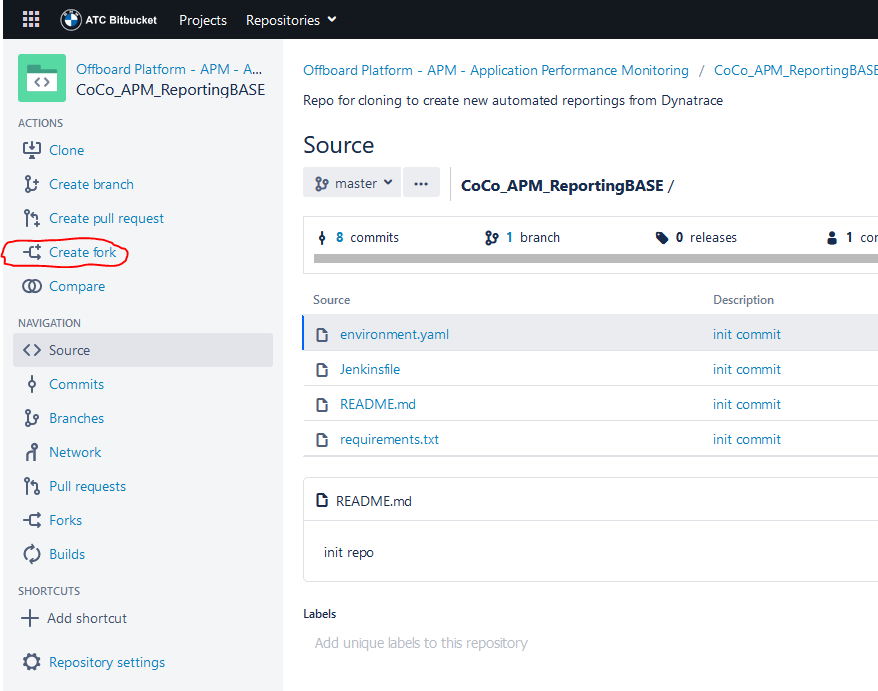
- Choose Project Offboard Platform - APM - Application Performance Monitoring
- Choose a name starting with CoCo_APM_Reporting_ and a useful suffix
- Uncheck Enable fork syncing
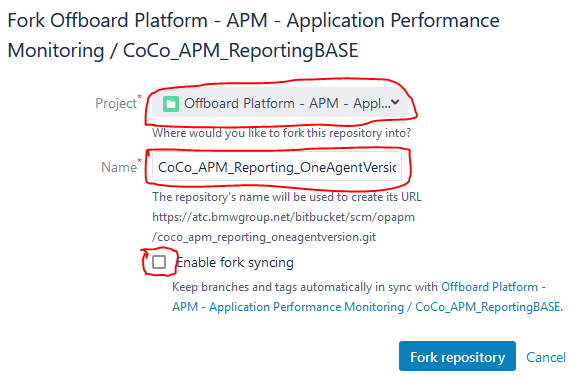
- Edit readme.md and describe your report
- Change/Update the environment, requirements and script according to your needs
- Login to Jenkins and select the folder Coco APM Reporting
- Click the New Item Button
- Enter the name of your repo (e.g. CoCo_APM_Reporting_OneAgentVersion)
- Select Multibranch Pipeline
- Click OK Button
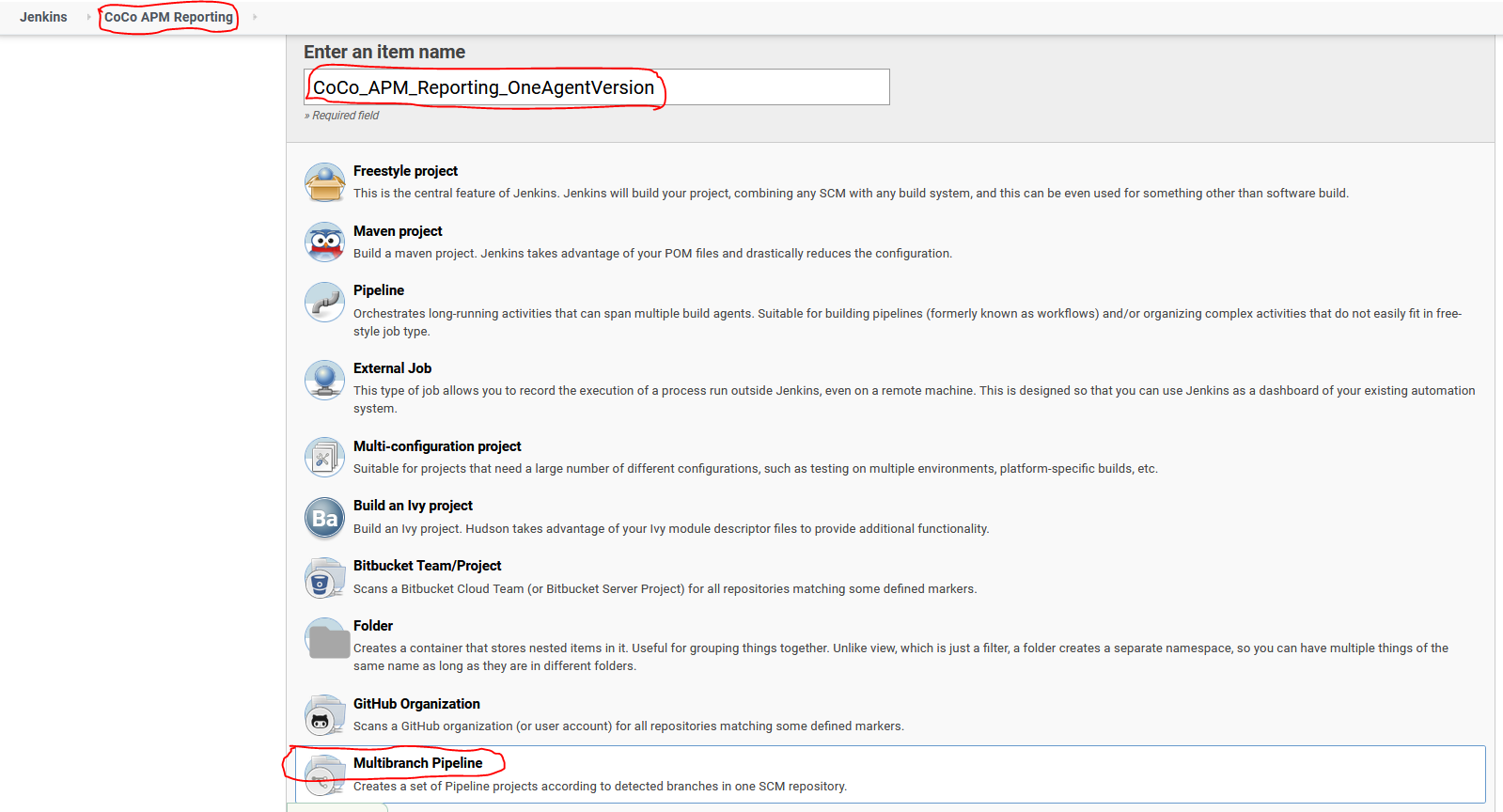
- On The Pipeline Settings go to Branch Sources, click ADD SOURCE and select Bitbucket
- Server: ATC
- Credentials: qqjaws7
- Owner: OPAPM
- Repository Name: your forked repository
- Behavious: According to screenshot
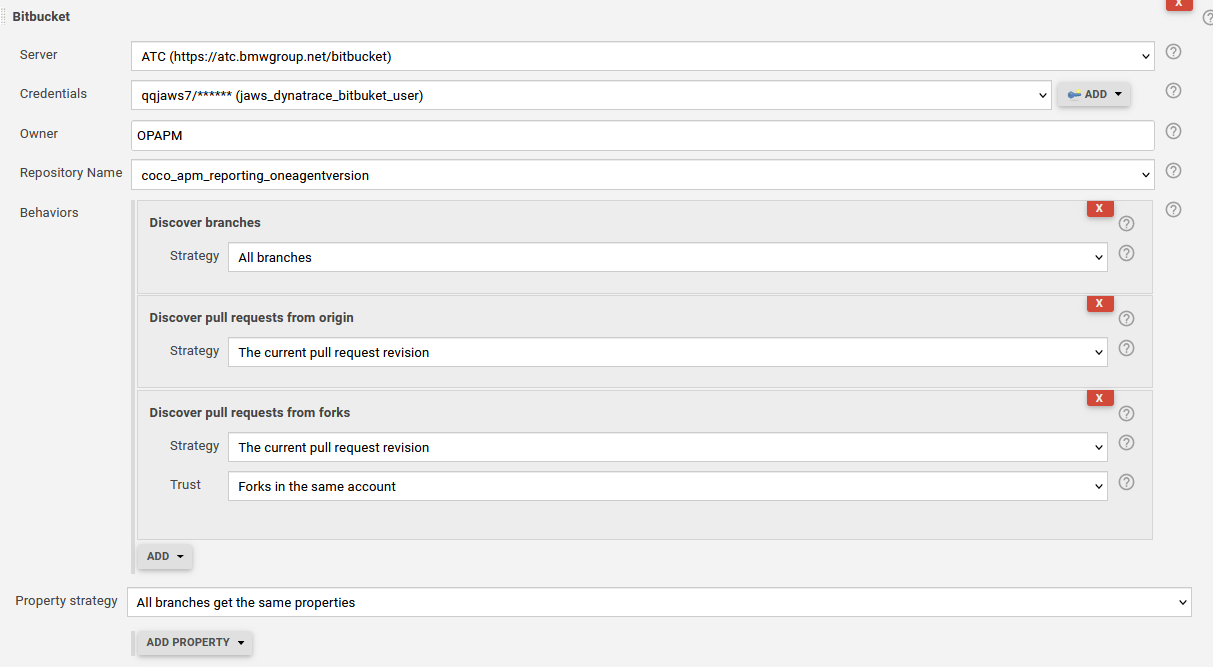
Your pipeline will automatically test-run for all 3 branches.