 21bee5c640
|
||
|---|---|---|
| .. | ||
| .DS_Store | ||
| Description.png | ||
| Readme.md | ||
| config.ini | ||
| requirements.txt | ||
| slo-report-monthly.py | ||
| slo-report.py | ||

Readme.md
Dynatrace-SLO-Report
- Automatically generates SLO reports (Pandas/Excel) from your Dynatrace environments.
Prerequisites
- Python 3.x (or lastest). Download
- Dynatrace API Token (Settings > Integration > Dynatrace API)
Required python packages are documented in the requirements.txt. Run pip install to install them pip install -r requirements.txt
Add QM-Report flag to SLOs
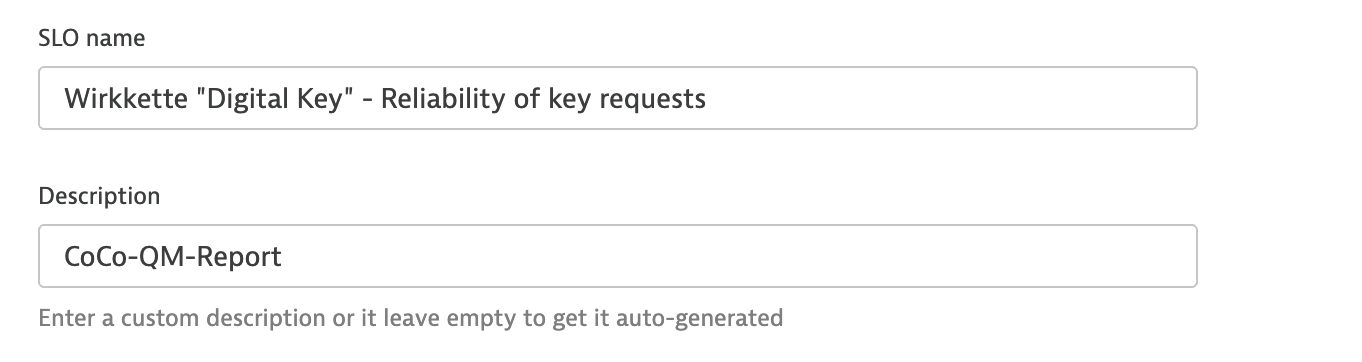
Dynatrace has a limit of 25 SLOs which can be downloaded until we would need to inlcude paging - to avoid that in the meantime please add to the SLOs which are relevant for the report the "CoCo-QM-Report" as a description. This will be used to filter the SLOs when requesting from Dynatrace
How to use it?
- Configure the file
config.ini:- [DATES]
- Specify the desired time range.
- [TENANTS]
- Specify all the tenants to extract the data from. i.e.:
tenant1 = https://abc12345.live.dynatrace.com <token> #tenant2 = https://abc22345.live.dynatrace.com <token> ... tenant3 = https://abc32345.live.dynatrace.com <token> - Use comments to avoid getting the data from a specific tenant
- Specify all the tenants to extract the data from. i.e.:
- [DATES]
cd <python file location>- Execute:
python slo-report.py- Note: Make sure to have installed python packages:
pip install <package-name>
- Note: Make sure to have installed python packages:
- Results will be stored in different folders (per enviroment) and sheets (per day).
Monthly Reporting
- Configure in
python slo-report-monthly.pyat line 69 & 80 thehoursinput variable to match with e.g. 28/29/30/31 days
date_report_end = date_report + datetime.timedelta(hours=744)
date_report = date_report + datetime.timedelta(hours=744)
- Execute:
python slo-report-monthly.py