<<<<<<< HEAD
# Dynatrace Reporting Pipeline
This repository is used as a template to create automated Dynatrace reports through Jenkins (JAWS) which are sent as attachement through mail.
***
## Jenkins environments
EMEA & NA: https://jaws.bmwgroup.net/opapm/
CN: https://jaws-china.bmwgroup.net/opmaas/
### Request access
Access is granted manually through stephan.oertelt@bmw.de and Mohammed.Abadel@bmw.de
### Multi-Branch Pipelines
- master (=latest) --> for testing and developing stuff
- staging --> pre-release branch, if stuff tested successfully here merge it to production
- production --> actively used, productive reports
***
## Minimum Content of a Dynatrace Reporting Repo
### Repository & Pipeline Naming
- Repository and Pipelines must have identical names
- Naming must start with CoCo_APM_Reporting_**report name here**
### readme-File
The readme file must contain a useful description **what** is reported **when** to **whom**
Example:
> This report is reporting all installed OneAgent versions including:
> - Hostnames
> - Environment Tag
> - PaaS Tag
>
> Sent to: coco-apm@bmw.de
>
> Executed on each Monday of every week
> Executed on every Dynatrace environment
### requirements.txt
The requirements.txt file must contain **all** python packages which are used within the script through ```import```
e.g.:
``` python-decouple
pyyaml
pandas
decouple
requests
datetime
argparse
```
### environments.yaml
The environments.yaml contains all environments on which the script should be executed, environments which should not be executed may be excluded through ```#```
**Do NOT change the environments names, the pipeline script is configured to distingue between EMEA/NA and CN as their are different Jenkins environments!**
The following snipped shows an environment file, which is only executed on Dynatrace prod environments.
```
euprod:
- name: "euprod"
- env-url: "https://xxu26128.live.dynatrace.com"
- env-token-name: "EUPROD_TOKEN_VAR"
#eupreprod:
- name: "eupreprod"
- env-url: "https://qqk70169.live.dynatrace.com"
- env-token-name: "EUPREPROD_TOKEN_VAR"
#napreprod:
- name: "napreprod"
- env-url: "https://onb44935.live.dynatrace.com"
- env-token-name: "NAPREPROD_TOKEN_VAR"
naprod:
- name: "naprod"
- env-url: "https://wgv50241.live.dynatrace.com"
- env-token-name: "NAPROD_TOKEN_VAR"
cnprod:
- name: "cnprod"
- env-url: "https://dynatracemgd-cn.bmwgroup.net/e/b921f1b9-c00e-4031-b9d1-f5a0d530757b"
- env-token-name: "CNPROD_TOKEN_VAR"
#cnpreprod:
- name: "cnpreprod"
- env-url: "https://dynatracemgd-cn.bmwgroup.net/e/b921f1b9-c00e-4031-b9d1-f5a0d530757b"
- env-token-name: "CNPREPROD_TOKEN_VAR"
```
### Jenkinsfile
The Jenkinsfile is the pipeline script itself including:
- Time-Trigger
- Install package step
- Execute script step
- Send Mail step
### Python Script
The script itself will gather and aggregate the data from the Dynatrace environments.
Script output must be a csv or excel file in the **folder where the script is executed**
***
## First Usage - Create a new Pipeline
### Fork this repo
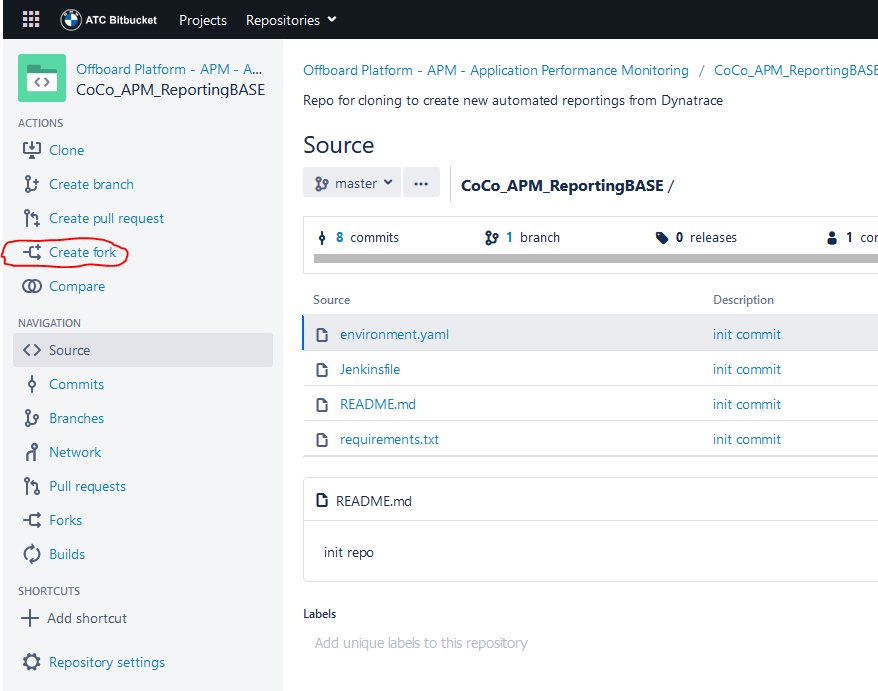
Do **NOT** clone this repo, create a fork instead.
1. On the left menue bar click on *Create fork*
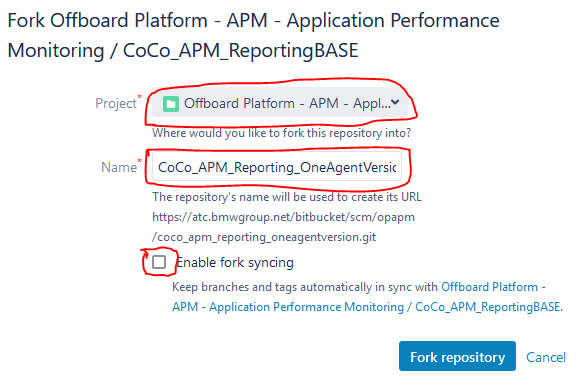
2. Choose Project *Offboard Platform - APM - Application Performance Monitoring*
3. Choose a name starting with *CoCo_APM_Reporting_* and a useful suffix
4. Uncheck *Enable fork syncing*
5. Edit readme.md and describe your report
6. Change/Update the environment, requirements and script according to your needs
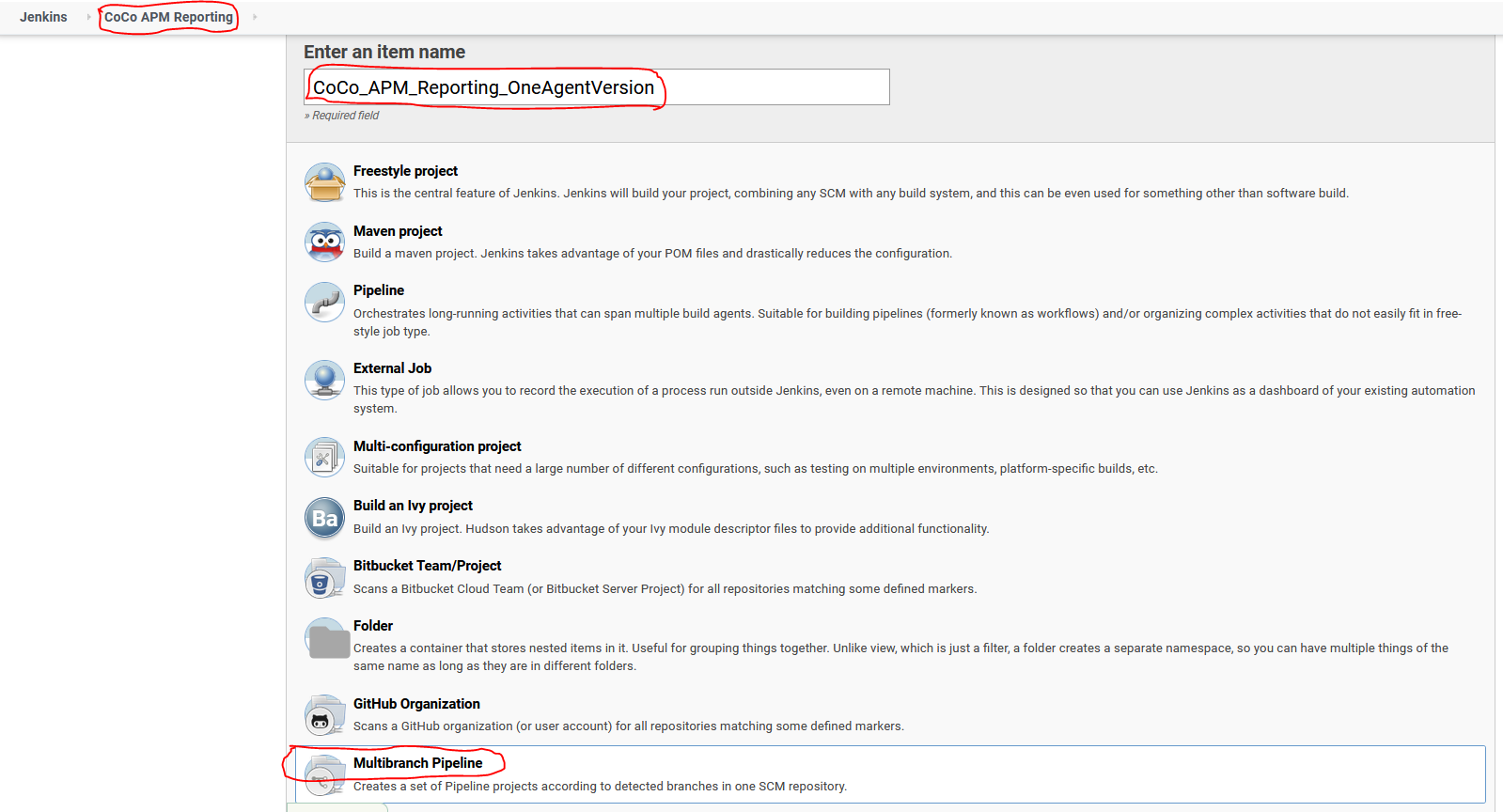
7. Login to Jenkins and select the folder *Coco APM Reporting*
8. Click the *New Item* Button
9. Enter the name of your repo (e.g. *CoCo_APM_Reporting_OneAgentVersion*)
10. Select *Multibranch Pipeline*
11. Click *OK* Button
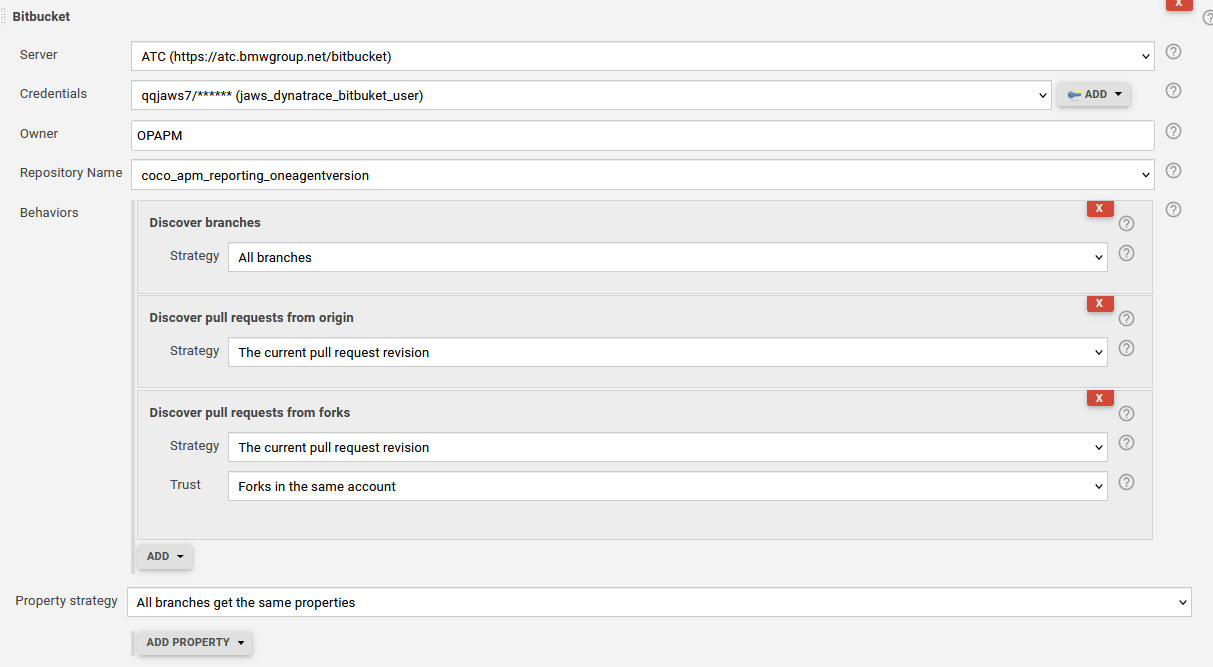
12. On The Pipeline Settings go to *Branch Sources*, click *ADD SOURCE* and select *Bitbucket*
- Server: **ATC**
- Credentials: **qqjaws7**
- Owner: **OPAPM**
- Repository Name: **your forked repository**
- Behavious: **According to screenshot**
Your pipeline will automatically test-run for all 3 branches.
=======
# TerraformOnboarding
The purpose of the exportConfig.py script is to export dynatrace specific services as terraform files. The importConfig.py script is used to additionally also export the states for each exported terraform file, since terraform does not do that by default.
# Setup
Run the following command to install all necessary dependencies:
```python
pip install -r requirements.txt
```
In order to ensure full functionality a `.env` file is necessary with the following format:
```yml
# Environment URLs
CN_PREPROD_ENV_URL="https://dynatracemgd-cn.bmwgroup.net/e/ab88c03b-b7fc-45f0-9115-9e9ecc0ced35"
CN_PROD_ENV_URL="https://dynatracemgd-cn.bmwgroup.net/e/b921f1b9-c00e-4031-b9d1-f5a0d530757b"
EMEA_PREPROD_ENV_URL="https://qqk70169.live.dynatrace.com"
EMEA_PROD_ENV_URL="https://xxu26128.live.dynatrace.com"
NA_PREPROD_ENV_URL="https://onb44935.live.dynatrace.com"
NA_PROD_ENV_URL="https://wgv50241.live.dynatrace.com"
# Environment Tokens
CN_PREPROD_API_TOKEN=""
CN_PROD_API_TOKEN=""
EMEA_PREPROD_API_TOKEN=""
EMEA_PROD_API_TOKEN=""
NA_PREPROD_API_TOKEN=""
NA_PROD_API_TOKEN=""
```
Place the `.env` file within the root directory of the project folder:
```bash
TerraformDynatrace Porter # Project Folder
├─── res
├─── templates
├─── .env # Add the environment file
├─── .gitignore
├─── README.md
├─── exportConfig.py
├─── imortConfig.py
├─── main.tf
└─── requirements.txt
```
# Run
You can simply run the script by executing the following example command within the projects root directory:
```python
python exportConfig.py
python importConfig.py
```
**Note:** First run the exportConfig.py script and once that is done run the importConfig.py script.
# Version
```python
Python 3.9.9
```
>>>>>>> 5b9784368712fb52b5411a7924b67569d40c051f